AI-901 Study Guide
Module 3 of 820 min read
Generative AI and Agents
Understand how large language models work, how prompts shape their outputs, and how AI agents extend models with tools and actions. This chapter also covers how to work with generative AI models and build agents in Microsoft Foundry.
These study notes summarise Microsoft Learn material for Exam AI-901. For the official skills measured, see the Microsoft Learn study guide for Exam AI-901.
On this pageShow
- How Large Language Models Work
- Tokenization
- Embeddings
- The Attention Mechanism
- Encoder-Decoder Architecture
- LLM vs Small Language Models
- Prompts and How to Use Them Well
- Types of Prompts
- Conversation History
- Retrieval-Augmented Generation (RAG)
- Tips for Better Prompts
- AI Agents
- The Three Components of an Agent
- Multi-Agent Systems
- Working with Generative AI in Foundry
- The Model Catalog
- Deploying a Model
- The Foundry Playground
- Building Agents in Foundry
- Publishing and Connecting Applications
- Configuring Your Model Deployment
- Deploying a Model in the Foundry Portal
- Building and Testing an Agent
- Key Takeaways for the Exam
How Large Language Models Work
In Module 1 you saw generative AI listed as one of the six core workloads, and in Module 2 you learned that LLMs are built on supervised learning principles. This module is where you go deep on both. By the end you'll know how language models work under the hood, how to communicate with them through prompts, how agents extend them with real-world actions, and how to put it all together in Microsoft Foundry.
A large language model (LLM) is the engine behind generative AI. It is a type of neural network trained on enormous volumes of text data to learn the statistical and semantic relationships between words and phrases. The core training goal of an LLM is simple: given a sequence of words, predict what comes next. Through billions of training iterations across massive datasets, the model learns not just word frequencies but deep semantic relationships, grammar, context, and reasoning patterns.
Tokenization
LLMs do not process words directly. They break text into tokens. A token is a chunk of text, roughly a word, part of a word, or a punctuation mark. For example, "unbelievable" might be split into "un", "believ", and "able". Tokenization lets the model handle vocabulary it has never seen before by breaking new words into familiar sub-parts. Each unique token is assigned a numeric ID, allowing the model to work with numbers rather than raw text.
Embeddings
Once tokenized, each token is converted into a vector, a list of numbers representing the token's meaning and position in multidimensional space. This is called an embedding. Tokens with similar meanings end up with similar vector values, which is how the model understands that "king" and "queen" are related, or that "Paris" and "France" belong in the same context.
The Attention Mechanism
The key innovation in modern LLMs is the attention mechanism. When processing a token, the model does not just look at that token in isolation. It looks at all the other tokens in the input and calculates how relevant each one is to understanding the current token. For example, in the sentence "The trophy did not fit in the bag because it was too big", the model uses attention to figure out that "it" refers to "trophy" and not "bag". This context-awareness is what makes LLMs far more powerful than older rule-based systems.
Encoder-Decoder Architecture
LLMs are based on a type of neural network architecture called the transformer. The transformer has two parts:
- Encoder: reads the input and builds a rich representation of its meaning
- Decoder: uses that representation to generate the output, one token at a time
Some models use only the decoder (like GPT-style models), which makes them well-suited for text generation. Others use both encoder and decoder (like translation models), which handles tasks that need to map from one structure to another.
LLM vs Small Language Models
Not every AI application needs a massive model. Models come in two broad categories:
- Large language models (LLMs): trained on vast amounts of data, capable of broad general tasks, powerful but computationally expensive
- Small language models (SLMs): compact and focused, suitable for specific domains or environments where compute is limited, such as mobile devices or embedded systems
Knowing how a model works under the hood helps you use it better. The main interface you have with a model is the prompt, and understanding the model's mechanics explains why prompt quality matters so much.
Prompts and How to Use Them Well
A prompt is the input you give to an LLM to generate a response. The quality of the prompt has a significant effect on the quality of the output.
Types of Prompts
There are two types of prompts in a typical generative AI application:
- System prompt: set by the application, defines the model's role, tone, constraints, and behavior. For example: "You are a friendly customer support agent. Always respond concisely and professionally."
- User prompt: the actual question or request from the end user. For example: "What is the refund policy for orders placed in the last 30 days?"
The model responds based on both. The system prompt shapes how it behaves; the user prompt tells it what to do.
Conversation History
LLMs are stateless. They do not remember previous exchanges by default. To maintain context across a conversation, the application includes the full conversation history in each request, passing all prior turns to the model so it can respond in context.
Retrieval-Augmented Generation (RAG)
One of the most common patterns in production AI applications is retrieval-augmented generation (RAG). Instead of relying purely on the model's training knowledge, the application retrieves relevant documents or data at query time and includes them in the prompt. This solves two problems: the model's knowledge has a cutoff date, and it has no access to your private data. With RAG, you can ground responses in your own up-to-date content.
Tips for Better Prompts
A few practical techniques that consistently improve results:
- Be specific. Vague prompts get vague responses.
- Tell the model what role to play. "Act as a senior software engineer reviewing this code" yields different output than "review this code".
- Specify the output format. If you need a JSON object or a numbered list, say so.
- Use examples. Showing the model one or two examples of the output you want (called few-shot prompting) is often more effective than describing it.
- Set a temperature. Lower temperature (closer to 0) makes responses more focused and consistent. Higher temperature (closer to 1) makes them more creative and varied.
- Set max output tokens to control response length and cost.
Prompts let you talk to a model. Agents let the model act. That is the key step up from generative AI to agentic AI.
AI Agents
An AI agent is an application built on a generative AI model that can generate responses and also take real-world actions to complete a goal.
The Three Components of an Agent
Every agent is built from three elements:
| Component | Description |
|---|---|
| Model | The LLM that provides language understanding and reasoning |
| Instructions | A system prompt that defines the agent's role, behavior, and constraints |
| Tools | Capabilities the agent can invoke to interact with the world |
Tools come in two categories:
- Knowledge tools: let the agent access information, such as search engines, databases, or document stores
- Action tools: let the agent perform tasks, such as sending emails, updating records, running code, or calling external APIs
Multi-Agent Systems
Agents can collaborate. In a multi-agent system, multiple specialized agents work together, each handling a specific part of a larger workflow. A lead agent (sometimes called an orchestrator) breaks down a complex goal and delegates subtasks to specialist agents. For example, a travel booking system might have one agent that handles flight searches, another that handles hotel lookups, and an orchestrator that combines both results into a complete itinerary - the same scenario introduced in Module 1, now explored in full detail.
You understand the concepts. Now let's look at where you actually build and run all of this in Azure.
Working with Generative AI in Foundry
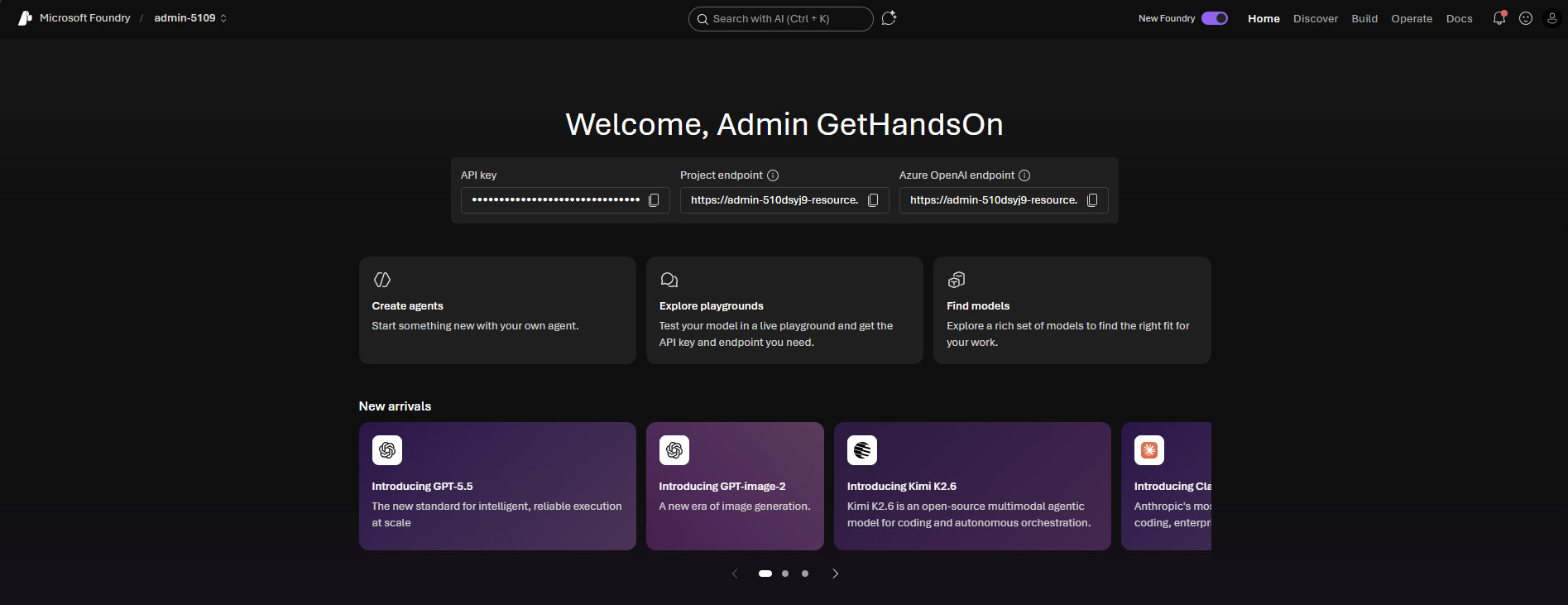
Microsoft Foundry is the home for generative AI development on Azure. Every step of the workflow, from choosing a model to deploying an agent, happens inside Foundry.
The Model Catalog
The model catalog is Foundry's library of available AI models. It includes models from Microsoft, OpenAI (GPT-4.1, GPT-4.1-mini, GPT-4o), Anthropic (Claude), Mistral, Meta (Llama), DeepSeek, and many others. Each model has a profile showing its strengths, context window size, and pricing.
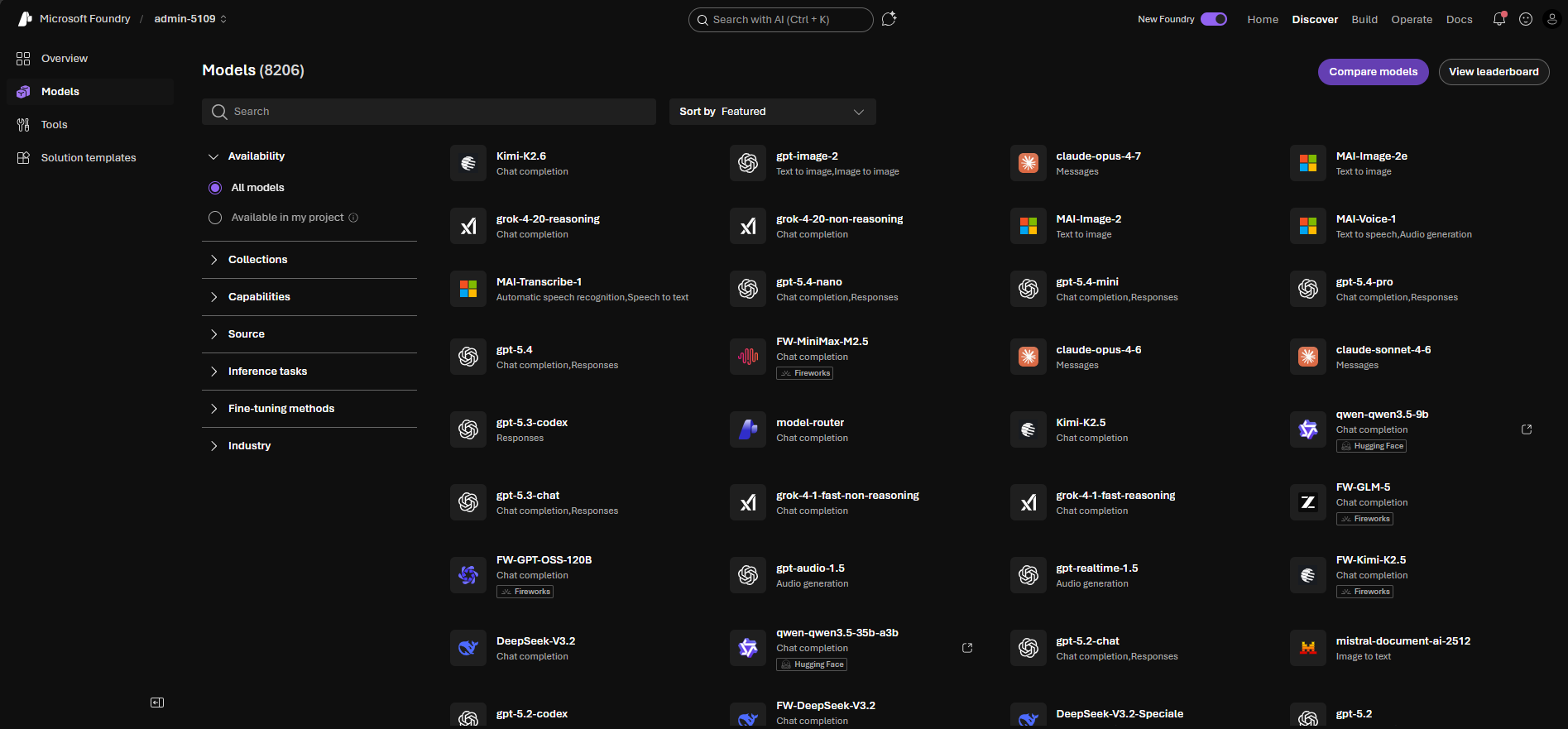
When choosing a model, consider:
| Factor | What to Look At |
|---|---|
| Task type | Is this open-ended chat, summarization, code generation, or classification? |
| Context window | How much text can the model handle in one request? |
| Speed vs quality | Smaller models are faster and cheaper; larger ones handle complex reasoning better |
| Cost | Billed per token, so long conversations with large models add up quickly |
Deploying a Model
Deploying a model makes it available as a live service your applications can call via an API. When you deploy a model in Foundry, you configure:
- Deployment type: standard, global batch, or provisioned throughput
- Model version
- Tokens per minute (TPM): the rate limit that determines how much traffic the deployment can handle
A token is the smallest unit of text a model processes. Monitoring your TPM usage helps avoid throttling in production.
The Foundry Playground
Once deployed, you can test your model in the Foundry Playground. The Playground lets you:
- Write system prompts and user prompts
- Adjust temperature (controls creativity vs. consistency) and max output tokens (caps response length)
- See responses in real time
- Export the exact API call as code in your preferred language
The Playground is the right place to experiment before writing application code. You can iterate on prompts in minutes rather than rebuilding and redeploying code.
Building Agents in Foundry
The Foundry Agent Builder lets you create agents without writing custom orchestration logic. There are two ways to create an agent in the Foundry portal:
- From the Chat playground: Deploy a model, configure it with a system prompt, then use Save as agent to save the configuration as a named agent. This is useful when you want to iterate on a model's instructions before formalising it as an agent.
- From the Build page: Select Create agents (or open the Agents tab on the Build page) to create an agent directly - without first going through the model playground. This is the path used when you already know what model and instructions you want.
Either way, you then:
- Choose a model from the catalog
- Write the agent's instructions (system prompt)
- Connect tools: built-in tools like Bing search or Azure AI Search, file search, or your own custom API tools
- Test the agent in the Agent playground
Publishing and Connecting Applications
Once your agent is ready, Foundry provides:
- Hosted endpoints: a URL your application calls to interact with the deployed model or agent
- SDK support: language SDKs that abstract the API calls, making it easier to integrate into application code
Your application follows a client-server pattern: the frontend or backend code sends requests to the Foundry endpoint, the model processes them, and the response comes back to your application.
What a Lightweight Application Needs
Every application that calls a deployed model requires the same three ingredients:
| Ingredient | What it is | Where to find it |
|---|---|---|
| Endpoint URL | The HTTPS address of your deployed model | Foundry portal → Deployments → your deployment |
| API Key | A secret credential that authorises your app to call the endpoint | Foundry portal → Deployments → Keys & Endpoint |
| SDK (code library) | A pre-built package that handles the technical communication details for you - so you call simple functions rather than crafting raw web requests | Added to your code project |
The call sequence, regardless of language or SDK, always follows the same three steps:
- Connect - set up a connection to the service using your endpoint URL and API key
- Send a prompt - pass your system message and user message to the model
- Read the reply - get the generated text back from the response
The Foundry portal's View code button (available in the Chat playground after deployment) generates starter code with your real endpoint values pre-filled, showing exactly this three-step pattern in whichever language you choose.
Exam tip: Questions ask what a client application needs to call a deployed model. The answer is always: the endpoint URL, an API key (or managed identity credential), and an SDK (or direct HTTP client library). The playground is for interactive testing; the SDK pattern is how you embed the model into a production application.
Configuring Your Model Deployment
When you deploy a model in Microsoft Foundry, you can configure parameters that control how the model generates output. The exam tests these directly.
Temperature controls randomness. A value of 0 makes the model deterministic - it always picks the most probable next token. Values closer to 1 increase creativity and variation. Use low temperature (0.0-0.3) for factual tasks like Q&A, and higher values (0.7-1.0) for creative writing or brainstorming.
Top-p (nucleus sampling) limits which tokens the model samples from. A top-p of 0.9 means the model only considers tokens that together account for 90% of the probability mass. Temperature and top-p serve similar purposes - the common practice is to adjust one and leave the other at its default.
Max tokens caps the length of the model's response. If a response hits the limit mid-sentence, it cuts off. Set this high enough for complete answers without wasting compute on unnecessary padding.
System message is the instruction you give the model before the conversation starts. It defines the model's persona, constraints, and behavior for the entire session. Every user message in that session is answered in the context of the system message.
Deployment SKU determines compute allocation. Standard deployments bill per token and share capacity. Provisioned deployments reserve dedicated capacity for consistent throughput at high volume.
Deploying a Model in the Foundry Portal
In Foundry, deploying a model takes only a few minutes. You select it from the Model catalog, choose a deployment type (Standard for pay-per-token, or Provisioned for reserved capacity), set a tokens-per-minute rate limit, and attach a content filtering policy. Once the deployment status shows Succeeded, it is immediately available in the Chat playground for testing, and via the SDK for your application code. Clicking View code in the playground generates the exact SDK snippet for your deployment.
For the exam, the key facts are: deployment type determines billing model; rate limit governs maximum throughput; content filtering policy is set at deployment time, not at model level.
📌 Note: The Foundry portal has two UI modes - New Foundry (used for agents and generative AI, with Build/Discover/Operate pages) and the classic Foundry interface (still required for some services such as the Language playground and Content Understanding workspace).
🔒 Hands-On Lab - Lab 1: Set Up Meridian's AI Foundation Deploy a real language model in a live Azure environment, open the Foundry portal and configure a system prompt for a hotel AI assistant. By the end you will have a working model deployment and your first AI conversation. Already enrolled? Labs are launching shortly - stay tuned!. New here? Get the AI-901 Lab Bundle →
Building and Testing an Agent
Agents combine a model with tools. In Foundry, you create an agent by selecting a model deployment, writing its system instructions, and optionally attaching tools such as file search, code interpreter, or custom function tools. Each agent gets a unique Agent ID that your application uses to target it via the SDK. You test the agent in the Agent playground before connecting it to application code.
For the exam, know that an agent requires three things: a model, instructions (system prompt), and optionally tools. The Agent ID is what the SDK uses to identify which agent to run.
🔒 Hands-On Lab - Lab 2: Build Meridian's 24/7 Guest Support Agent Create a real AI agent in Foundry, attach a knowledge document as a file search tool, evaluate it against test questions, and connect it to an application. By the end you will have a fully working agent serving real guest queries. Already enrolled? Labs are launching shortly - stay tuned!. New here? Get the AI-901 Lab Bundle →
🔒 Hands-On Lab - Lab 7: Foundry IQ - Build Meridian's Knowledge Hub Connect Foundry IQ to Aria using Azure AI Search, upload Meridian's knowledge documents, and test multi-document RAG queries in a live Azure environment. By the end Aria will answer questions grounded in Meridian's real policies and guides. Already enrolled? Labs are launching shortly - stay tuned!. New here? Get the AI-901 Lab Bundle →
Key Takeaways for the Exam
- LLMs predict the next token based on context, learning from vast datasets through training rather than explicit rules.
- Tokenization breaks text into numeric chunks. Embeddings represent those chunks as vectors. Attention lets the model weigh relevance across all tokens.
- The transformer has an encoder (understands input) and a decoder (generates output). GPT-style models use only the decoder.
- System prompts define behavior; user prompts provide the task. LLMs are stateless - conversation history must be passed in each request.
- RAG grounds model responses in your own data by retrieving relevant content at query time.
- An agent needs three things: a model, instructions, and tools. Tools are either knowledge-based (read data) or action-based (do things).
- Deployment parameters: Temperature controls randomness (0 = deterministic, 1 = creative). Top-p limits the token pool. Max tokens caps response length. System message shapes all replies in a session.
- Standard deployments bill per token; Provisioned deployments reserve dedicated capacity.
- Foundry portal flow: Model catalog → Deploy → Deployments (check Succeeded) → Chat playground → View code.
- Each agent requires a model, a system prompt (instructions), and optionally tools. The Agent ID identifies the agent when called from an application.
- Foundry IQ is Foundry's built-in RAG (retrieval-augmented generation) system. It uses Azure AI Search as its vector store backend. Within Foundry IQ you create knowledge bases - named collections of data from one or more sources (Azure AI Search indexes, SharePoint, data lakes, etc.) that agents can query to ground their responses in your organization's content.
Official exam information from Microsoft
- Study guide for Exam AI-901: Microsoft Azure AI Fundamentals (skills measured, weights and passing score), and the Microsoft Certified: Azure AI Fundamentals certification page.